


Redesigning a website can feel exciting. You get to refresh the look, improve the layout, update old content, and make your business feel more modern online. But a new design alone does not make a website successful.
A beautiful site can still fail if pages load slowly, forms do not work, links are broken, or your search rankings drop after launch.
That is why planning matters so much. A website redesign checklist helps you slow down, look at every important detail, and launch with confidence.
Think of it like packing for a trip and you would not leave home without checking your clothes, tickets, phone charger, and passport. In the same way, you should not launch a redesigned website without checking design, content, SEO, speed, security, and tracking.
A good redesign should make life easier for your visitors. They should find information quickly, understand what you offer, and know what to do next.
Whether you want more calls, more form submissions, more sales, or a stronger brand image, the right preparation can make your new site work much better.
Why Website Redesign Planning Matters
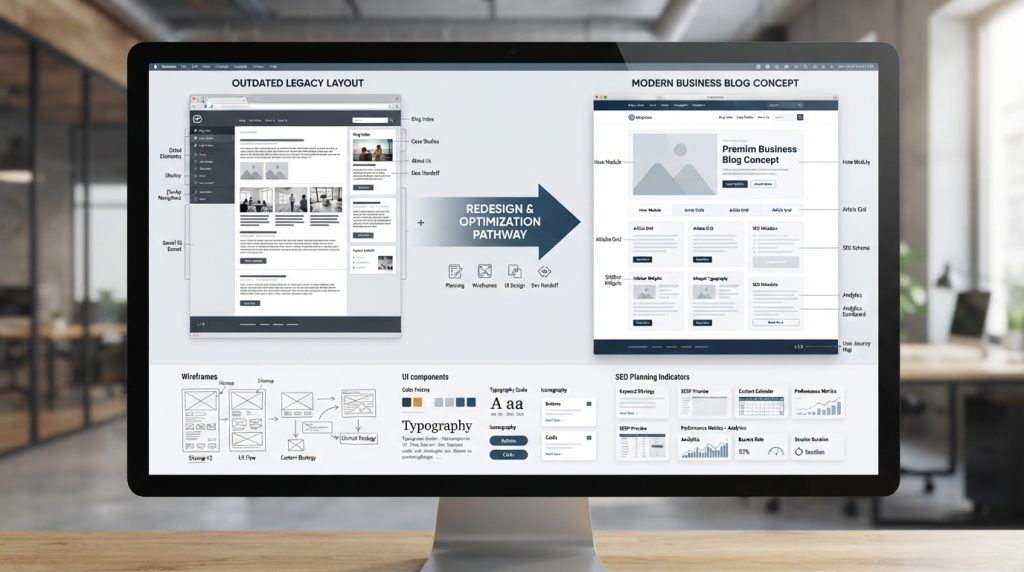
A website redesign is not just a design project, but it is a business decision. Your website is often the first place people visit before they contact you, buy from you, or trust your brand. If the redesign is rushed, it can create problems that are hard to fix later.
For example, you may remove an old service page that was bringing in traffic from Google. You may change URLs without setting up redirects.
You may launch a new contact form and later realize messages were not being delivered. These mistakes sound small, but they can cost leads, sales, and trust.
That is why a website redesign checklist is useful before any launch. It gives your team a clear path to follow. Designers, developers, writers, SEO specialists, and business owners can all stay on the same page. Instead of guessing what is ready, everyone knows what still needs attention.
Good planning also helps you protect what already works. A redesign should not wipe out your best pages, strongest rankings, or clearest messages. It should improve them.
1. Define the Goal of Your Website Redesign
Before changing colors, fonts, images, or layouts, ask one simple question, why do we need to redesign this website.
Maybe your current site looks outdated. Maybe it is hard to use on mobile. Maybe visitors come to the site but do not contact you. Maybe your business has changed, and your website no longer explains your services clearly. Each goal will shape the redesign in a different way.
A good website redesign checklist starts with clear goals because goals guide every decision. If your goal is better lead generation, your new design should focus on stronger calls to action, easier forms, and clearer service pages.
If your goal is better branding, your visuals, tone, and message need to feel consistent. If your goal is better SEO, you need to protect important pages and improve content quality.
Without a goal, a redesign can become a guessing game. With a goal, every page has a purpose.
2. Review Your Current Website Performance
Before building the new site, take a close look at the old one. Your current website can teach you a lot. Some pages may already be doing well. Others may be confusing visitors or losing traffic.
Look at which pages get the most visits, which pages bring leads, and where people leave the site. If one blog post gets steady traffic, you probably do not want to delete it.
If a service page has many visitors but no conversions, it may need better copy, stronger visuals, or a clearer button.
You should also check how people use the site.
- Are they clicking your phone number?
- Are they filling out forms?
- Are they reaching important pages easily?
This information helps you make smarter redesign choices instead of relying only on opinions.
A redesign should be based on real user behavior, not just what looks nice.
3. Audit Your Existing Website Content
Content is one of the most important parts of a website redesign. Many businesses focus on design first and content later, but that often creates problems. A great layout cannot save weak, outdated, or confusing content.
Start by reviewing every main page. Keep content that is accurate, useful, and performing well. Update pages with old information, weak headlines, or unclear service details. Remove content that no longer helps your visitors or your business.
You may also find content gaps. For example, your website may talk about your services but not explain your process, pricing factors, service areas, or frequently asked questions. These missing details can stop people from taking the next step.
Content should answer the questions your visitors already have in their minds. If people understand what you do, who you help, and why they should trust you, they are more likely to contact you.
4. Protect Your SEO Before Redesigning

SEO is one area where redesign mistakes can be expensive. If your old website has pages ranking on Google, you need to protect them during the redesign. Changing page URLs, deleting content, or removing important keywords can hurt your visibility.
This is where your website redesign checklist should include an SEO review. Save your current URL structure, page titles, meta descriptions, headings, internal links, and important keywords.
If any URLs are changing, create a redirect plan before launch. Redirects help send users and search engines from old pages to the correct new pages.
Also check your internal links. If one page links to another page that no longer exists, visitors may land on an error page. That creates a poor experience and can hurt trust.
SEO should not be handled after launch as a quick fix. It should be part of the redesign from the beginning.
5. Plan the New Website Structure
A strong website structure makes your site easier to use. Visitors should not feel lost. They should quickly understand where to go, whether they want your services, pricing information, contact details, or blog content.
Your website redesign checklist should include a clear sitemap. A sitemap is simply a plan for all the main pages on your website. It shows how pages connect and where they belong.
For example, your homepage may lead to service pages, about page, case studies, blog, and contact page. Each service page should explain one main topic clearly. Avoid hiding important pages deep inside the website where users may never find them.
Simple navigation is usually better than clever navigation. People should not have to think too hard to move around your site.
6. Focus on User Experience and Design

Good design is not only about looking modern. It is about making the website easy and pleasant to use. A clean design helps people focus on your message. Clear buttons help them take action. Good spacing makes the page easier to read.
Your website should also build trust. Real photos, helpful service details, client reviews, case studies, certifications, and clear contact information can all make your business feel more reliable.
Keep your branding consistent across the site. Colors, fonts, button styles, and image choices should feel connected. If every page looks different, the website can feel messy or unprofessional.
7. Make Sure the Website Is Mobile-Friendly
Many people will visit your site from a phone. If your website looks great on a desktop but is hard to use on mobile, you may lose a large number of visitors.
Any website redesign checklist should include mobile testing. Check if text is easy to read, buttons are easy to tap, menus open properly, and forms are simple to complete.
A phone number should be clickable. Images should fit the screen. Pages should not feel cramped.
Imagine someone standing in a parking lot, searching for your business on their phone. They do not want to pinch, zoom, or fight with a broken menu. They want quick answers and a mobile-friendly website makes that possible.
8. Check Website Speed and Performance

Speed matters because people do not like waiting. If your website takes too long to load, visitors may leave before they even see your content.
Large image files are one common reason websites becomes slow. Compress images before uploading them. Avoid using too many heavy scripts, plugins, animations, or videos that slow the page down. Good hosting also makes a big difference.
Website speed can affect user experience, conversions, and SEO. A faster site feels smoother and more professional. It also helps visitors move from page to page without frustration.
Before launch, test your most important pages. Your homepage, service pages, contact page, and landing pages should all load quickly.
9. Review Forms, Buttons, and Conversion Paths
A website should not only look good but it should help people take further action. That action might be calling your business, requesting a quote, booking a consultation, signing up, or buying a product.
Test every form before launch. Submit a test message and make sure it reaches the right inbox. Check thank-you pages, confirmation emails, phone number links, quote buttons, and appointment links.
Your website redesign checklist should also cover the full user journey. For example, if someone lands on a service page, can they easily contact you or If they read a blog post, is there a clear next step through which they should be redirected to the right place.
Small details can have a big effect on conversions.
10. Set Up Analytics and Tracking
After launch, you need to know how the new website is performing. Guessing is not enough. Analytics help you see what is working and what needs improvement.
Set up tools like Google Analytics and Google Search Console before the new site goes live. These tools can show traffic, search performance, user behavior, and technical issues.
You should also track important actions such as form submissions, phone clicks, purchases, downloads, or appointment bookings. Your website redesign checklist should also cover these tracking steps so you can measure success from day one.
Without tracking, you may have a nice-looking website but no clear idea if it is helping your business grow.
11. Test Website Security and Technical Setup
Security is another important part of a successful launch. Your website should have an SSL certificate, which helps protect user data and shows the secure lock icon in the browser.
Also check backups before launch. If something goes wrong, a backup can save you from major stress. Review plugins, themes, integrations, hosting settings, and browser compatibility.
Your site should work well on major browsers like Chrome, Safari, Firefox, and Edge. It should also display correctly on different screen sizes.
Technical checks may not sound exciting, but they protect your website from avoidable problems.
12. Complete a Pre-Launch Website Testing Checklist

Before you launch, slow down and test the full website. This is the final review stage, which helps catch mistakes before real visitors see them.
This part of the website redesign checklist should include:
- Check all main pages for errors
- Test every link, button, and menu item
- Proofread page content carefully
- Test contact forms and confirmation messages
- Check images, videos, and icons
- Review redirects and 404 pages
- Test the website on desktop, tablet, and mobile
- Confirm analytics and tracking are working
This is the one place where a simple checklist really helps. It gives you a clear final pass before launch.
13. Launch the New Website Carefully
Launching a website should be calm and controlled. Do not rush it at the busiest time of the week. Choose a time when your team can watch the site closely and fix issues quickly if needed.
Keep a backup of the old site. Make sure your developer is available during the launch. After the new site goes live, check the homepage, important pages, forms, redirects, and tracking again.
Even with careful planning, small issues can appear after launch. That is normal. The goal is to find and fix them quickly before they affect too many users.
A careful launch helps protect traffic, leads, and trust.
14. What to Check After Launch
The work does not stop once the new website is live, for the first few days and weeks after launch are very important. Watch your traffic, rankings, form submissions, and user behavior.
Check for broken links, missing pages, crawl errors, slow pages, or tracking problems. Review how people move through the new site and If users are leaving an important page too quickly, it may need better content or a clearer call to action.
A redesigned website should keep improving. Launch is not the finish line. It is the start of a better online experience.
Common Website Redesign Mistakes to Avoid
One common mistake is focusing only on design. A pretty website is not enough if users cannot find information or take action. Another mistake is ignoring SEO until after launch. By then, rankings may already be affected.
Changing URLs without redirects is another serious issue which can lead visitors to broken pages and confuse search engines. Businesses also make the mistake of launching without testing forms, buttons, mobile layouts, and tracking.
Another mistake is writing content for the business instead of the customer. Your website should not only say what you offer, it should also explain how you help, what makes you trustworthy, and what users should do next.
Avoiding these mistakes can make your redesign smoother and more successful.
Final Website Redesign Checklist Before Launch
Use this final website redesign checklist as a quick review before going live:
- Website goals are clear
- Current website performance is reviewed
- Content audit is complete
- SEO redirects are ready
- Sitemap and navigation are planned
- Mobile design is tested
- Website speed is optimized
- Forms and buttons are working
- Analytics and tracking are installed
- Security and backups are checked
- Post-launch monitoring plan is ready
This quick review helps make sure nothing important is missed.
Conclusion
A website redesign can be one of the best moves for your business, but only when it is done with care. It is not just about making the site look fresh. It is about making the site faster, clearer, safer, easier to use, and better at turning visitors into customers.
When you plan properly, you protect your SEO, improve the user experience, and avoid stressful launch problems. You also give your visitors a better reason to stay, explore, and trust your business.
The best redesigned websites are not built by accident. They are built with clear goals, smart planning, careful testing, and steady improvement after launch. Follow the right steps, check the details, and your new website will have a much stronger chance of performing well from the very first day.
Frequently Asked Questions
A website redesign checklist is a step-by-step guide that helps you prepare your website before launching a new design. It covers important areas such as content, SEO, website speed, mobile responsiveness, security, forms, and analytics. Following a checklist helps prevent common mistakes, protects your search engine rankings, and ensures visitors have a smooth experience when the new site goes live.
A complete website redesign checklist should include clear redesign goals, a content audit, SEO planning, URL redirects, mobile testing, page speed optimization, working contact forms, analytics setup, SSL security, browser compatibility, and a final review of all pages, links, and images. Completing these checks before launch reduces the risk of technical issues and missing functionality.
A well-planned website redesign can improve SEO by creating a better site structure, improving page speed, enhancing the mobile experience, updating outdated content, and making navigation easier for both users and search engines. When SEO best practices are followed throughout the redesign process, your website has a better chance of improving its search visibility and attracting more organic traffic.
Some of the most common mistakes include changing URLs without setting up redirects, deleting valuable content, ignoring SEO, launching without proper testing, and focusing only on visual design instead of user experience. Failing to monitor website performance after launch can also lead to missed opportunities to fix problems quickly.
To prevent traffic loss, keep your important pages, create 301 redirects for any changed URLs, preserve valuable content, maintain on-page SEO elements, and test the website thoroughly before launching. It is also important to monitor search rankings and website traffic after launch so you can identify and resolve any issues as early as possible.
Before launching, test every important part of your website, including navigation menus, internal links, contact forms, call-to-action buttons, images, videos, page speed, mobile responsiveness, browser compatibility, redirects, and analytics tracking. A complete round of testing helps ensure visitors can use the website without any problems.
The timeline depends on the size and complexity of the website. A small business website may take between four and eight weeks, while a larger website with custom features, extensive content, and SEO improvements can take several months. Proper planning and testing are key to keeping the project on schedule.
Most businesses should evaluate their website every two to three years to ensure it still meets customer expectations and business goals. However, a full redesign is only necessary when the website looks outdated, performs poorly, no longer reflects the brand, or fails to provide a good user experience across modern devices.
Need a Website Redesign That Delivers Better Results?
A successful website redesign is more than a fresh look. Our website design services help businesses create modern, user-friendly websites with better performance, SEO, and conversions.
From planning and responsive design to technical improvements, we build websites that support your business growth and provide a better experience for visitors.
Book Your Free Project Consultation Call
