


Building a website in 2026 can cost a few hundred dollars for a DIY project or tens of thousands of dollars for a professionally developed business platform. A basic small-business website may cost $1,500 to $8,000 through a freelancer, while a professionally managed agency project can range from $5,000 to $25,000 or more. Advanced ecommerce features, specialized integrations, and custom web applications can push costs beyond $50,000.
The right budget depends on your website’s purpose, number of pages, design requirements, functionality, and ongoing support needs. Before requesting quotes for website development services, it helps to understand what you are paying for, which expenses continue after launch, and where you can save without compromising quality.
This guide breaks down realistic US pricing, recurring expenses, hidden charges, and practical budgets for different businesses. You will also learn how to compare quotes, plan a redevelopment project, and choose a solution without overspending.
KEY TAKEAWAYS
- Website development costs range from hundreds to six figures, depending on complexity, functionality, and provider expertise.
- DIY builders suit simpler projects, while freelancers and agencies handle increasingly customized business requirements.
- First-year ownership expenses include hosting, domains, software licenses, maintenance, and other recurring operational costs.
- Comparing project scopes, deliverables, and ongoing support helps businesses choose solutions that fit their budgets.
Planning a Website for Your Business?
Get a clearer idea of the budget, features, and development approach your project may require. American Design Agency LLC can help you explore a website solution aligned with your business goals.
Discuss Your Website ProjectWhat Is the Website Development Cost in 2026?
The website development cost varies according to the website’s size, functionality, platform, and development method. A DIY website may require only a few hundred dollars in first-year expenses, while a custom business website can cost several thousand dollars to build.
Ecommerce stores, membership platforms, and web applications generally require larger budgets because they involve additional functionality and testing.
The following ranges are planning estimates for US businesses, not fixed industry rates or guaranteed quotes. They represent illustrative budgets for different project types and levels of complexity. Published pricing guides from WebFX, Elementor, and Upwork provide additional context, although their pricing data covers different services and methods of estimating costs.
| Website type | Estimated initial cost | Typical features |
| DIY personal website | $100–$500 | Template, basic pages, domain, hosting |
| DIY small-business website | $200–$1,000 | Business pages, contact forms, basic SEO setup |
| Freelancer-built business website | $1,500–$8,000 | Customization, responsive layouts, contact forms |
| Professional agency website | $5,000–$25,000 | Strategy, custom layouts, testing, analytics setup |
| Content-rich corporate website | $10,000–$50,000 | Multiple page templates, CMS, integrations |
| Template-based ecommerce store | $3,000–$15,000 | Product catalog, cart, checkout, payment setup |
| Custom ecommerce platform | $25,000–$100,000+ | Advanced product logic, custom integrations, automation |
| Custom web application | $30,000–$150,000+ | User accounts, databases, workflows, dashboards |
Important: These are estimated project ranges, not fixed industry rates. A store with 20 products and standard checkout may cost far less than one with thousands of products, custom shipping rules, and complex inventory connections.
How to Interpret These Estimates
These figures are illustrative planning ranges rather than prices reported directly by every source linked above. Actual quotes depend on the project requirements, provider experience, content responsibilities, integrations, and testing needed.
For example, an ecommerce store with 20 products and a standard checkout may cost considerably less than one with thousands of products, custom shipping rules, inventory integrations, and automated workflows.
Unless stated otherwise, treat the figures as initial development budgets and check whether domain registration, hosting, premium software, content creation, taxes, and ongoing maintenance are included in any quote.
How We Estimated Website Development Costs
The prices in this guide are planning estimates for US businesses, not fixed industry rates or guaranteed project quotes. Actual costs depend on the project scope, development provider, required functionality, design complexity, and ongoing support.
We use published pricing references and clearly defined project scenarios to explain how costs may vary. Where a figure is an illustrative planning estimate rather than a directly reported industry benchmark, it should be interpreted accordingly.
For fair comparisons, consider the number of unique page templates, content responsibilities, integrations, testing requirements, migration work, and post-launch support included in each proposal.
Recurring expenses such as hosting, domains, paid software, and maintenance are considered separately from the initial development fee unless explicitly stated otherwise.
Published pricing guides illustrate how widely website development costs can vary. WebFX’s pricing guide lists costs ranging from approximately $500 for a basic DIY website to more than $100,000 for complex professional projects. Elementor’s website cost guide places freelance projects at around 1,000 – 10,000 and agency projects at around 10,000–50,000 or more. These figures are not directly interchangeable: pricing depends on the project scope, functionality, provider, and services included.
What Do Different Budget Levels Get You?
A small budget can establish a credible online presence, but it usually requires compromises in customization, support, or functionality.
- Under $1,000: A DIY site with a template, basic pages, and limited paid tools.
- $1,000–$5,000: A modest freelancer-built website with a defined scope and standard features.
- $5,000–$15,000: A professionally developed small-business website with stronger customization, content support, and testing.
- $15,000–$50,000: A larger business website, growing e-commerce store, or platform requiring more complex integrations.
- $50,000 and above: Advanced e-commerce systems, custom web applications, enterprise functionality, or specialized workflows.
If you’re wondering how much does it cost to make a website, start by matching your budget to the features you actually need. The overall website development cost can range from a few hundred dollars for a DIY site to tens of thousands for a custom platform. Use these budget levels as a starting point, then request quotes based on your specific requirements.
How Website Prices Differ by Development Method
The method you choose influences both your upfront spending and your responsibilities after launch. Building the website yourself reduces labor expenses but requires your time. Hiring a freelancer gives you access to specialized skills, while an agency can coordinate multiple disciplines under one project.
The following comparison assumes a small-business website rather than an advanced application.
| Factor | DIY builder | Freelancer | Professional agency |
| Initial budget | $100–$1,000 | $1,500–$8,000 | $5,000–$25,000+ |
| Typical delivery | Several days to several weeks | 2–8 weeks | 4–12+ weeks |
| Design | Templates and self-customization | Customized layouts | Strategy-led design and coordinated delivery |
| Development | Builder tools and plugins | Depends on skills and scope | Team-based development and testing |
| Content | Usually owner-supplied | May be included | Can include copywriting and content planning |
| Advanced features | Limited by platform | Available at additional cost | Better suited to complex, multi-system projects |
| Ongoing support | Self-managed or platform support | Depends on agreement | May include a maintenance plan |
| Best suited to | Very small budgets | Defined projects needing specialist help | Businesses needing broader expertise |
All cost and timeline figures are estimates. The actual scope, provider, and revision process determine the final quote.
When comparing web development prices, check what each provider includes in the quoted amount. DIY platforms may have lower upfront expenses, while freelancers and agencies may include more design, development, and testing. Comparing equivalent deliverables gives you a clearer picture of the total web development costs.
Not Sure Which Website Development Option Is Right for You?
Choosing between a DIY builder, freelancer, or agency depends on your budget, required features, and long-term goals. Compare your options carefully to find an approach that meets your business needs without unnecessary expenses.
Explore Your Website OptionsDIY Website Builders
Website builders are attractive because they combine templates, editing tools, and hosting into a relatively simple workflow. You can often create pages, publish content, and make routine updates without hiring a developer.
For a basic business website, a planning budget of $200–$1,000 for the first year may cover a domain, a paid platform plan, and essential extras. Your own time is not included, and premium features can increase the total.
Popular options include Wix, Squarespace, and WordPress.org. Compare their current plans before committing because features, storage limits, e-commerce capabilities, and renewal prices differ.
DIY is a practical choice for consultants, freelancers, portfolio owners, or small local businesses with straightforward requirements. It becomes less attractive when you need complicated integrations, extensive customization, or technical support you cannot provide yourself.
Freelance Developers
Freelancers often offer a sensible middle ground when a business needs a professional website but doesn’t require a full agency team. They can build on WordPress or another CMS, customize an existing template, and implement a defined set of features.
Upwork’s September 2026 guide reports that freelance website projects can range from a few hundred dollars to $15,000 or more, depending on the project and developer. Its published hourly benchmarks also vary by skill and experience. You should therefore evaluate the proposed deliverables rather than assume that a lower hourly rate means a lower total project price.
A freelancer quote should specify page templates, mobile responsiveness, contact forms, integrations, content responsibilities, revision rounds, and launch support. It should also identify whether you will receive administrator access and ownership of the website files.
Freelancers are especially useful for projects with clear requirements. However, if the project requires a designer, backend developer, copywriter, security specialist, and project manager, coordinating separate contractors may become difficult.
Professional Development Agencies
An agency usually costs more because the project may involve several specialists and a formal delivery process. Depending on the provider, you may receive discovery, planning, design, development, testing, analytics configuration, and launch support.
Elementor’s 2026 guide places many agency projects in the $10,000–$50,000-plus range, although smaller agencies and more limited scopes can charge less. Clutch’s September 2026 pricing guide reports that many listed web development projects cost under $10,000, while hourly rates vary substantially by provider and location.
An agency can be worthwhile when the website is central to lead generation, ecommerce revenue, customer service, or internal operations. Businesses that lack the time to coordinate a complex project may benefit from custom website development services tailored to their technical and operational requirements.
Do not assume every agency package includes everything you need. Ask for an itemized proposal and confirm whether copywriting, photography, SEO, migration, training, and ongoing support are included.
Which Factors Affect the Cost of Website Development?
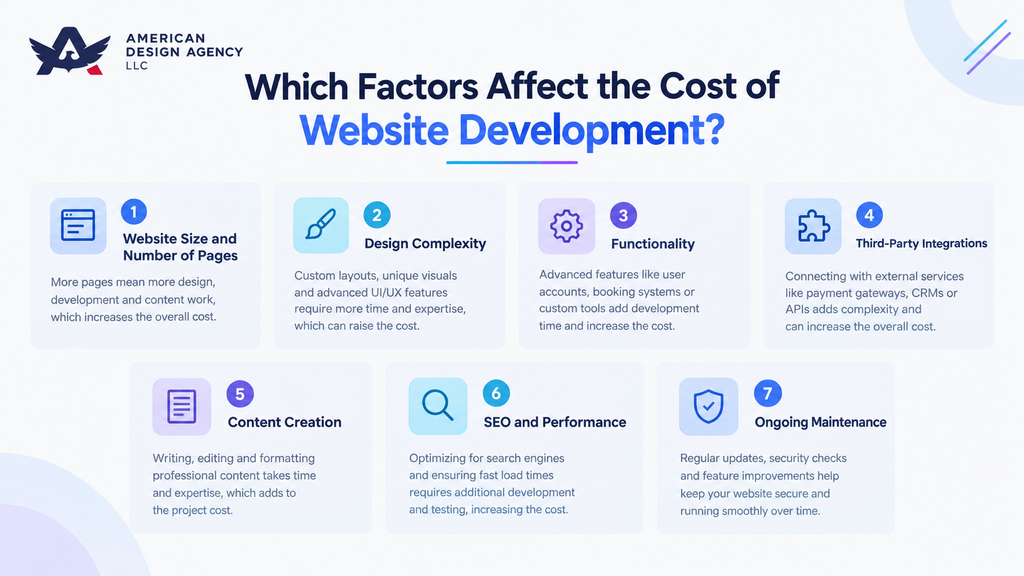
Two websites with the same number of pages can have very different budgets. The difference usually comes from the work behind those pages: custom layouts, functionality, integrations, content, and quality assurance.
1. Website Size and Page Structure
A five-page brochure website is generally less expensive than a corporate website with dozens of unique page layouts. However, page count alone is not enough to calculate a project.
Twenty service pages built from one reusable template may require less work than eight pages with custom calculators, account areas, or interactive content. A developer should estimate the number of unique templates and the complexity of each one.
Before requesting a quote, list the required pages and identify which can share a common layout. This makes proposals easier to compare and helps prevent unnecessary development work.
2. Design and User Experience
A template-based layout costs less than a completely custom design because the developer starts with an existing structure. Custom design can be valuable when the business needs a distinctive brand experience, specialized interactions, or a carefully planned conversion journey. The website design cost depends on the level of customization, the number of unique layouts, and the user experience work required.
User experience work may include wireframes, prototypes, usability reviews, accessibility checks, and mobile layouts. These activities require time, but they can reveal problems before expensive development work begins.
If your budget is limited, prioritize the pages that influence buying decisions, such as service pages, pricing pages, product pages, and lead forms. A smaller, well-structured website can be more useful than a large site with confusing navigation.
3. Front-End and Back-End Development
Front-end development creates the interface visitors see and use. It includes page layouts, navigation, buttons, responsive behavior, animations, and interactive components.
Back-end development handles the systems behind the interface. Databases, user accounts, permissions, payment logic, order processing, and custom workflows may all require backend work.
A website built with a standard CMS can use existing functionality for many routine tasks. A custom application may need developers to design and test these systems from scratch.
When reviewing a proposal, ask the provider to explain the major development tasks and identify any custom code. This will help you understand why two projects with similar designs may have different budgets.
4. Custom Features and Integrations
Custom functionality can increase the budget quickly because it requires additional planning, implementation, and testing.
Common examples include:
- Appointment booking with availability rules.
- Customer dashboards and secure login.
- Product configurators or pricing calculators.
- Memberships and restricted content.
- CRM and inventory synchronization.
- Payment gateway integrations.
- Automated emails and order notifications.
- Reporting dashboards and administrative tools.
The cost of website development depends on the number of features, their complexity, and how reliably they must operate. Connecting a standard contact form to an email service is very different from synchronizing orders across an ecommerce store, warehouse, and accounting system. Before investing in custom functionality, check whether an existing plugin or platform can meet your needs at a lower cost.
5. Content, Photography, and SEO
Website development is not only a technical task. The project may also require copywriting, product descriptions, professional photography, illustrations, video, and content migration.
Some developers populate pages with content supplied by the client, while others offer content strategy and copywriting as separate services. Clarify this distinction before comparing quotes.
Technical SEO work may include indexability checks, redirects, XML sitemaps, metadata configuration, structured data, and performance improvements. Ongoing content marketing and link building are separate activities and should not automatically be assumed to be included in the build.
A realistic proposal should state who supplies the content, how many pages are covered, and whether revisions or migration work are included.
6. Security, Accessibility, and Testing
Testing ensures the website behaves as expected across browsers, devices, forms, and common user journeys. Ecommerce projects also require checkout testing, transaction verification, and careful handling of errors.
Security work may involve secure authentication, access controls, software updates, backups, and configuration reviews. More sensitive projects may need additional assessments and specialist advice.
Accessibility requirements should also be considered during planning rather than postponed until launch. The applicable obligations depend on the organization, website, and circumstances, so seek qualified guidance when necessary.
The more critical the website is to daily operations, the more important it becomes to specify testing, security responsibilities, and acceptance criteria in the contract.
7. Project Timeline and Revisions
A rushed deadline can increase costs when a developer must rearrange other work or allocate additional resources. Delays can also create extra expenses if the project team must repeat testing or revise previously approved work.
Agree on milestones for discovery, design approval, development, content entry, testing, and launch. Decide how many revision rounds are included and how additional requests will be priced.
Scope changes are especially expensive when they arrive after development has started. Maintain a list of essential features and place lower-priority ideas into a future improvement phase.
One-Time Development Costs and Recurring Expenses
A website budget should separate the cost of building the site from the cost of keeping it online. A one-time project fee does not necessarily cover hosting renewals, paid software, backups, technical support, or future changes.
Your website development price should clearly separate one-time setup work from ongoing expenses. Before accepting a quote, check whether design, development, content preparation, testing, and migration are included. This breakdown helps you understand which services account for the initial budget and which may require separate payments.
The following figures are broad planning estimates for small US business websites. They are not universal provider prices, and some items may already be bundled into a platform plan.
One-Time Costs
| Item | Estimated range | Pricing unit |
| Discovery and planning | $300–$2,000 | Per project |
| Design and prototyping | $800–$5,000 | Per project |
| Front-end development | $1,000–$5,000 | Per project |
| Back-end development | $1,000–$8,000 | Per project |
| Content and image preparation | $300–$3,000 | Per project |
| Testing and launch | $200–$1,500 | Per project |
| Migration or data import | $300–$5,000+ | Per project |
These line items are estimates, not a mandatory list of charges. Some providers bundle several services into one fixed price, and complex projects can exceed the ranges shown.
Recurring Costs
| Expense | Estimated range | Pricing unit |
| Standard domain registration | $10–$30 | Per year |
| Basic shared hosting | $3–$15 | Per month |
| Managed hosting | $20–$100+ | Per month |
| Premium themes and plugins | $0–$500+ | Per year |
| Professional maintenance | $50–$200+ | Per month |
| Privacy or consent software | Depends on plan | Monthly or annual |
| Marketing and SEO | Depends on scope | Monthly |
For domains and hosting, check both introductory rates and renewal prices. A discounted first year can make a platform look cheaper than it will be over a longer period.
SSL certificates are included with many hosting and website-builder plans. Confirm what your provider supplies before paying for a separate certificate.
Maintenance pricing varies with the service level. A basic plan might cover updates and backups, while a more comprehensive agreement could include monitoring, troubleshooting, small content changes, and response-time commitments.
What Does First-Year Ownership Really Cost?
Consider a small professional-services website with an initial build estimate of $5,000. Assume the owner pays $240 for hosting, $20 for the domain, $180 for premium tools, and $1,200 for maintenance during the first year.
| Expense | First-year estimate |
| Website build | $5,000 |
| Hosting | $240 |
| Domain | $20 |
| Premium tools | $180 |
| Maintenance | $1,200 |
| Estimated first-year total | $6,640 |
This example excludes advertising, extensive content production, taxes, and future feature development. It also assumes maintenance is charged for the full year.
The point is that the initial quote is only one component of the total budget. Ask every provider to distinguish setup charges from recurring commitments.
Realistic Website Budgets for Different US Businesses
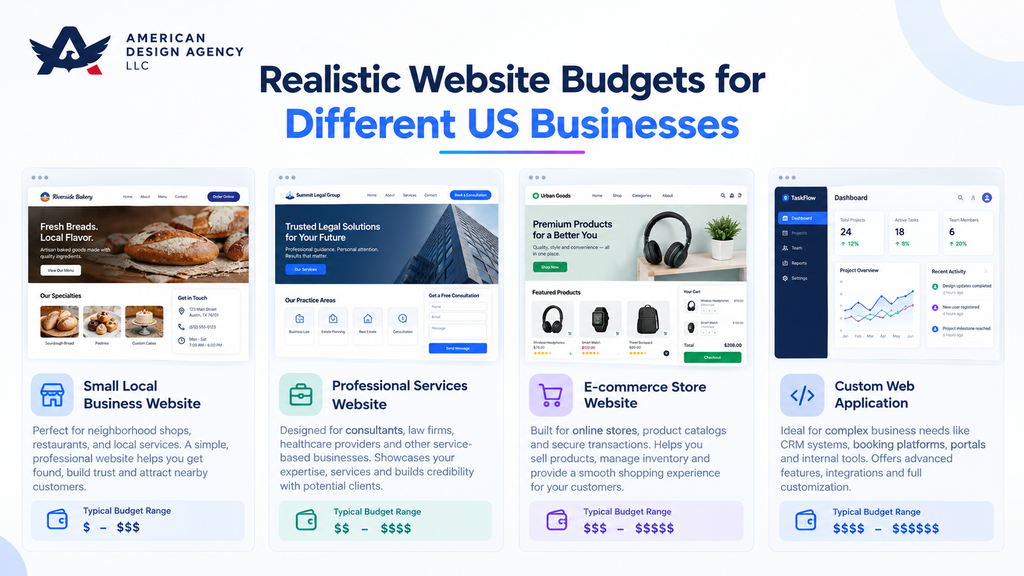
The examples below illustrate how scope changes the budget. Each scenario uses planning estimates rather than a claim that every business in the category should pay the same amount.
Example 1: Local Contractor Website
Imagine a roofing company that needs a professional website to generate estimate requests. The company has an existing logo, service descriptions, and photographs but no current website.
| Item | Estimated cost |
| Five to eight core pages | $2,000 |
| Mobile-responsive layouts | $600 |
| Contact and estimate-request forms | $400 |
| Basic technical SEO setup | $500 |
| Testing and launch | $300 |
| Estimated initial build | $3,800 |
The proposed scope includes a home page, service pages, about page, project gallery, testimonials, and contact page. It assumes standard forms rather than a custom estimating engine.
The contractor should budget separately for hosting, domain renewal, ongoing maintenance, and marketing. A site that integrates with scheduling software or a customer relationship management system may cost more.
For inspiration, businesses can review best contractor websites to see how service pages, project photos, reviews, and prominent calls to action are presented. Use those examples to identify useful features rather than copying another company’s design.
Example 2: Professional Services Firm
A small accounting or consulting firm needs a website with service pages, staff profiles, a resource section, lead forms, and analytics.
| Item | Estimated cost |
| Discovery and content planning | $800 |
| Design and development | $4,500 |
| Resource section and CMS setup | $700 |
| Forms and analytics configuration | $400 |
| Testing and launch | $300 |
| Estimated initial build | $6,700 |
This estimate assumes that the firm supplies approved copy and photographs. Professional copywriting, extensive content migration, multilingual pages, or secure client portals would add to the budget.
The firm should also decide who will update its articles, manage software licenses, and review technical performance after launch.
Example 3: Small Ecommerce Store
Consider a retailer launching an online store with approximately 50 products, standard payment processing, shipping configuration, and basic inventory management.
| Item | Estimated cost |
| Store setup and theme customization | $2,000 |
| Product catalog and data entry | $1,000 |
| Checkout and payment configuration | $800 |
| Shipping and tax setup | $500 |
| Testing and launch | $500 |
| Estimated initial build | $4,800 |
This scenario assumes a hosted e-commerce platform and ordinary product options. It does not include custom inventory software, complex product configuration, or extensive product photography.
The owner must also account for platform subscriptions, paid apps, payment processing fees, returns, and marketing. These expenses may increase as sales volume grows.
Example 4: Growing Business with Custom Workflows
A growing company needs a website connected to its CRM, with customer login, quote requests, automated notifications, and a dashboard for staff.
| Item | Estimated cost |
| Discovery and technical planning | $2,000 |
| Custom design and front-end development | $5,000 |
| Backend workflows and authentication | $7,000 |
| CRM integration | $3,000 |
| Security and functional testing | $2,000 |
| Training and launch | $1,000 |
| Estimated initial build | $20,000 |
This estimate assumes a defined set of workflows and a supported CRM. Complicated permissions, legacy data migration, or multiple integrations could increase the cost significantly.
The business should confirm who will maintain the integrations and how failures will be detected and resolved. Custom features often need ongoing technical attention when third-party systems change.
Example 5: Custom Ecommerce Platform
A retailer with a large catalog, specialized pricing, several sales channels, and custom operational requirements may need a more extensive solution.
A planning budget of $30,000–$100,000 or more may be appropriate for a substantial custom project. The actual price depends on product complexity, data migration, inventory connections, customer account features, testing requirements, and expected traffic.
At this level, the company should expect a detailed specification, milestone-based delivery, security planning, and formal acceptance testing. The budget should also cover ongoing hosting, monitoring, backups, integration maintenance, and future improvements.
Get a Website Budget That Fits Your Business
Whether you need a small-business website, an ecommerce store, or a platform with custom workflows, defining your requirements is the first step toward a realistic estimate. Assess your project’s scope, essential features, and ongoing costs to plan a website that fits your budget.
Discuss Your Project BudgetHidden Costs Businesses Often Overlook
Unexpected expenses frequently arise because a proposal covers the visible website but not every activity required to operate it.
Content and Data Migration
Moving an existing website can involve exporting articles, importing products, preserving images, mapping old URLs, and testing redirects. A large or poorly structured site may require substantial manual work.
Before approving a rebuild, ask whether migration includes all existing pages, blog posts, product records, media files, and metadata. Confirm that the provider will test important redirects to reduce the risk of broken links and lost search visibility.
Paid Plugins, Apps, and Integrations
A website may depend on third-party tools for bookings, subscriptions, email marketing, security, analytics, or customer support. Some have free tiers, but advanced functionality often requires a recurring subscription.
Request a list of every paid component and identify the account owner. You should know whether licenses remain active after the development contract ends and what it costs to renew them.
Training and Content Updates
A content management system may be easy to use, but staff still need to understand how to publish pages, update products, manage forms, and handle common issues.
Ask whether training is included and whether it comes with documentation or recorded sessions. If your team cannot manage routine changes, you may need a monthly support agreement.
Privacy and Legal Requirements
Depending on the business and how the website collects and processes data, you may need privacy disclosures, cookie-consent tools, terms, or other legal documentation. Requirements vary by jurisdiction and business activity.
Tools such as iubenda offer compliance-related products with different plan levels. Treat any subscription as a potential budget item rather than assuming every website needs the same package.
Legal software does not automatically guarantee compliance. Businesses with complex data practices should obtain appropriate professional advice.
Hosting, Performance, and Traffic Growth
A basic hosting plan may be sufficient for a small brochure website. High traffic, large product catalogs, intensive database operations, or strict uptime requirements can demand a more capable setup.
Ask what happens if your traffic increases, storage limits are reached, or your site needs additional resources. Understand the upgrade path before your business depends on the website for critical operations.
When Should You Redevelop an Existing Website?
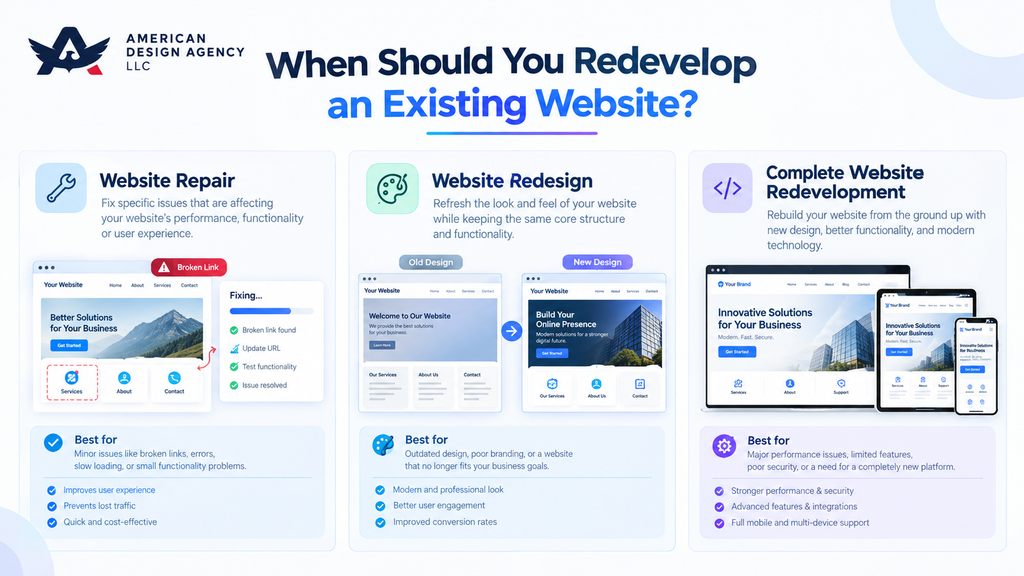
A rebuild may be appropriate when your current website no longer supports your business needs. However, replacing the entire site is not always necessary.
Consider redevelopment if the platform is difficult to maintain, essential integrations are unreliable, mobile usability is poor, security updates are no longer available, or the site cannot support new business processes.
Before choosing a full rebuild, compare three options:
- Repair: Fix bugs, broken forms, performance issues, or outdated software.
- Redesign: Improve the visual experience and navigation while retaining the underlying platform where practical.
- Redevelop: Rebuild major components or move to a new platform because the existing architecture no longer meets requirements.
A small repair project may cost hundreds to a few thousand dollars. A redesign can require several thousand dollars, while a full redevelopment may cost as much as a new website or more. These are broad planning ranges. The amount of reusable content, integrations, and legacy data makes a substantial difference.
Before migration, inventory the existing pages, traffic sources, important URLs, forms, integrations, and analytics. Define which features must be preserved and which can be retired.
The cheapest proposal is not necessarily the best option if it excludes redirects, content migration, testing, or post-launch troubleshooting.
How to Compare Development Quotes
A fair comparison begins with scope. If one provider includes 10 page templates, content entry, testing, and training while another offers only a basic build, the headline prices do not describe equivalent services.
Request an Itemized Proposal
Ask each provider to break the project into discovery, design, development, integrations, content, testing, launch, and support. The provider does not need to disclose every internal business expense, but you should understand the work covered by the quoted price.
A useful proposal should identify:
- The number of pages and unique templates.
- The functionality and integrations included.
- The content and assets you must supply.
- The number of revision rounds.
- The project timeline and approval milestones.
- The testing and launch process.
- The ownership and access arrangements.
- Any exclusions, optional extras, or recurring fees.
Check Ownership and Access
Confirm that your business will control the domain, hosting account, website administrator account, and relevant third-party subscriptions. Establish who owns custom code, design assets, and other deliverables under the contract.
Ask how you can retrieve your files and data if you later change providers. A website should not become difficult to move simply because account ownership was never discussed.
Evaluate Maintenance and Post-Launch Support
A proposal should explain what happens after launch. Some providers include a limited period for fixing defects, while others offer separate maintenance plans.
Distinguish warranty or bug-fix support from ongoing feature development. Ask how updates are handled, how backups are restored, how urgent issues are reported, and whether response times are specified.
Ongoing Website Maintenance Services may include software updates, backups, security monitoring, performance checks, and small content changes. Confirm which activities are included and which are billed separately.
Compare Value, Not Just Price
A low website price can be attractive, but missing content, unclear ownership, or limited testing may create additional expenses later. A higher quote is not automatically better either.
Ask providers to explain their approach, demonstrate relevant work, and clarify what is included so you can compare the real value of each proposal.
A Practical Checklist for Choosing the Right Solution
Use this checklist before signing a contract or selecting a platform.
- Define the goal: Decide whether the website must generate leads, sell products, publish content, or support internal workflows.
- Set a realistic budget: Include the initial build, first-year operating costs, and a reserve for unexpected requirements.
- List essential features: Separate must-have functionality from ideas that can wait until a later phase.
- Choose the development method: Compare DIY tools, freelancers, and agencies based on complexity and your team’s available time.
- Check the platform: Confirm that it supports your required integrations, content workflow, security needs, and expected growth.
- Request comparable quotes: Give providers the same requirements so you can compare their proposals fairly.
- Confirm deliverables: Document the pages, functionality, testing, migration, training, and launch support included.
- Check recurring fees: List hosting, domain renewal, licenses, platform subscriptions, and maintenance charges.
- Confirm ownership: Make sure your business controls the domain, accounts, data, and agreed project deliverables.
- Plan for launch and beyond: Assign responsibility for updates, backups, security, analytics, and future improvements.
A small business with straightforward needs may be able to launch with a builder or freelancer. A company that depends on complex integrations or custom workflows may benefit from a specialist team.
The best solution is the one that meets your current requirements without creating unnecessary costs or blocking reasonable future growth.
Conclusion
The website development cost depends on what your business needs its website to accomplish. A straightforward online presence may require a modest investment, while a custom platform needs more planning, specialist development, and ongoing technical support. Reviewing web development costs alongside first-year ownership expenses helps you set a realistic budget and plan for future growth.
Compare the scope of each proposal, account for first-year ownership expenses, and prioritize the features that directly support your business goals. Do not pay for advanced functionality simply because it is available, but avoid cutting essential corners in security, usability, and testing.
When evaluating professional web development services, look for a provider that explains the work, documents exclusions, and offers a practical plan for maintaining the website after launch.
American Design Agency LLC can be considered by businesses exploring website development options. Whatever provider you choose, make sure the proposed solution fits your budget, your operational needs, and your plans for growth.
Let’s Build a Website That Supports Your Growth
Have a website project in mind? Explore your options, define your requirements, and choose a website solution that supports your business goals and budget.
Get in TouchFrequently Asked Questions
A website can cost a few hundred dollars for a DIY project, around $1,500–$8,000 for a modest freelancer-built business site, or $5,000–$25,000 or more for an agency project. Complex ecommerce websites and custom applications may cost $25,000–$100,000 or more. The final amount depends on functionality, design, integrations, and ongoing support.
A basic DIY website may cost approximately $200–$1,000 during the first year, excluding the value of your time. A professionally developed five- to eight-page business website may cost around $1,500–$8,000, depending on the provider and scope. Hosting, domain renewals, maintenance, and paid tools may increase the total.
Yes, three months is often enough for a standard small-business website or a moderately complex project with clearly defined requirements. A simple site may launch sooner, while a large ecommerce platform or custom application may need more time. Delays commonly arise from changing requirements, late content, integration problems, and extended approval cycles.
The best approach depends on your budget, technical skills, and business requirements. A website builder works well for straightforward projects, a freelancer can handle a defined custom build, and an agency can coordinate larger projects requiring multiple specialists. Start by listing your essential features and comparing the full cost of building and maintaining each option.
There is no single best platform for every website. Wix and Squarespace are accessible options for many small businesses and portfolios. WordPress.org offers extensive flexibility for content-rich websites, while Shopify is designed for ecommerce. Compare current pricing, customization, integrations, ownership, and maintenance requirements before choosing.
Five common website types are business websites, ecommerce websites, blogs and publications, portfolio websites, and web applications. Business websites provide information and generate leads, ecommerce sites sell products, blogs publish content, portfolios showcase work, and web applications support interactive tasks such as booking, account management, or reporting.
The three-second rule is a common usability guideline suggesting that visitors should quickly understand a page’s purpose and find an obvious next step. It is not a universal technical standard. Clear headings, readable content, intuitive navigation, and fast loading can improve the experience, although actual performance should be measured with user testing and relevant analytics.
Yes, websites can generate revenue through product sales, service inquiries, subscriptions, advertising, affiliate links, digital products, and lead generation. Results depend on the business model, audience, offer, traffic quality, and conversion rate. A website does not guarantee income, it needs a clear purpose, useful content, effective calls to action, and an appropriate way to reach potential customers.
